

What’s BEST navigation app for traveling in Korea?
What kind of map do you usually use for your daily life? I’m not sure what you use, but I guess most people use Google Maps, Waze, or other specific navigation apps installed in their vehicles.
Despite Google Maps being the number one navigation app in the world, many of my tourists feel uncomfortable using it while traveling. Therefore, I compare the four most highly utilized apps – Google, Apple, Naver, and Kakao – and provide some tips to easily choose an app for travelers in Korea.
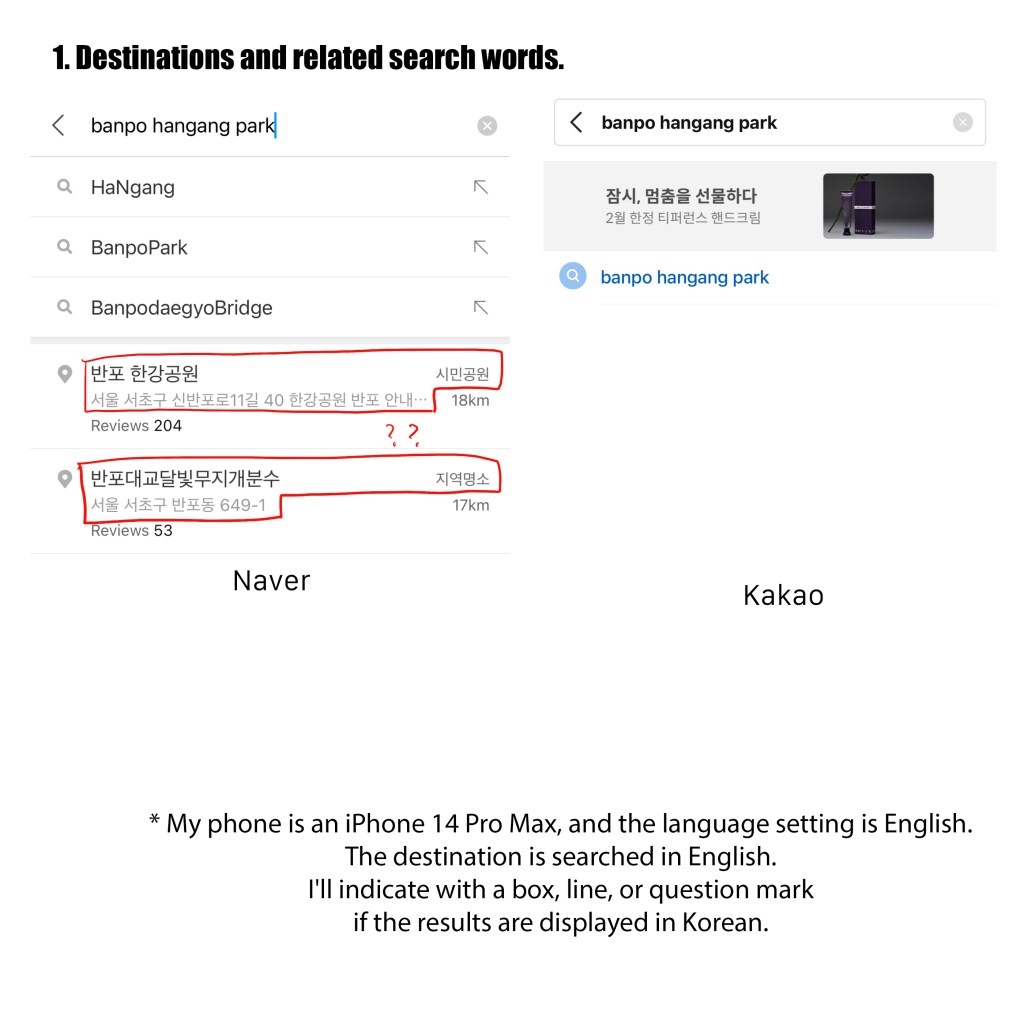
* My phone is an iPhone 14 Pro Max, and the language setting is English. The destination is searched in English. I’ll indicate with a box, line, or question mark if the results are displayed in Korean.
1. Destinations and related search words.
Apple and Kakao show only one word that exactly matches the keyword. Naver shows one more related result, which is a famous attraction nearby. This typically does not cause confusion when choosing a destination. Google provides more related search words, indicating that they consider where tourists can meet people and how to reach places.

2. Selecting a destination and displaying it on the map
I tried to scale the maps to a similar size. Each map shows different results.
Google: It seems they mainly focus on using public transportation, as they prominently mark bus stops and stations around the destination. Most of the information is written in both Korean and English, and they also mark some unique places that the other maps don’t have.
Apple: It seems to lack information around the destination. Above all, almost all restaurants and other places are written in Korean.
Naver: It has written all the destinations in English, and it also includes almost all symbolic things like stations, attractions, and districts written in Korean. However, detailed hashtags about destinations are written in Korean. I hope tourists can understand the keywords of destinations quickly. If tourists get lost, it would be good to ask a Korean for help.
Kakao: Almost everything is written in English, but the names of bridges and rivers are in Korean. It shows a lot of attractions and some stations compared to others. This is a good result for tourists, but it can cause trouble if they ask for directions from Koreans with this result.


3. Selecting public transportation
Apple indicate that public transport is unavailable, which is completely different from the other apps. Google and Korea maps show a 10-minute difference, but I assume this is due to different search times. However, the suggestions on Google Maps seem overly intricate.
Naver and Kakao show slightly different results, with Naver recommending the metro and Kakao recommending the bus. However, Kakao’s result is based on my preferences, not just the data they have. But Kakao makes a huge mistake by listing stations where tourists ride, transfer, and drop off in Korean. All the names of places are listed in Korean, even though I searched for them in English. I wonder how tourists can select their destination.


4. Restaurant or attractions near destination
All the maps provide their recommendations with ratings. Unfortunately, many restaurants don’t have English names, even in English-based apps, some restaurant names are shown in Korean. Apple seems to lack information about restaurants. Google, Naver, and Kakao show different information about restaurants, which is due to differences in users.
As we know, Google is G.O.A.T map for international tourists but not commonly used by Koreans, especially for searching restaurants and attractions. So, you can find the best restaurants rated by internationals on Google, and for Korean selections, use Korean maps.
You can select recommended restaurants in English on Naver Map. However, all the details like operating hours, reservations, and discount coupons are displayed in Korean. Also, this map suggests advertised restaurants at the top of the list, which can be confusing.
Kakao Map has a Restaurant searching button in Korean. However, the results are a bit more varied than Naver Map. It also includes keywords like break time and to-go, specified in Korean. If you find the right button, Kakao might be a better choice.


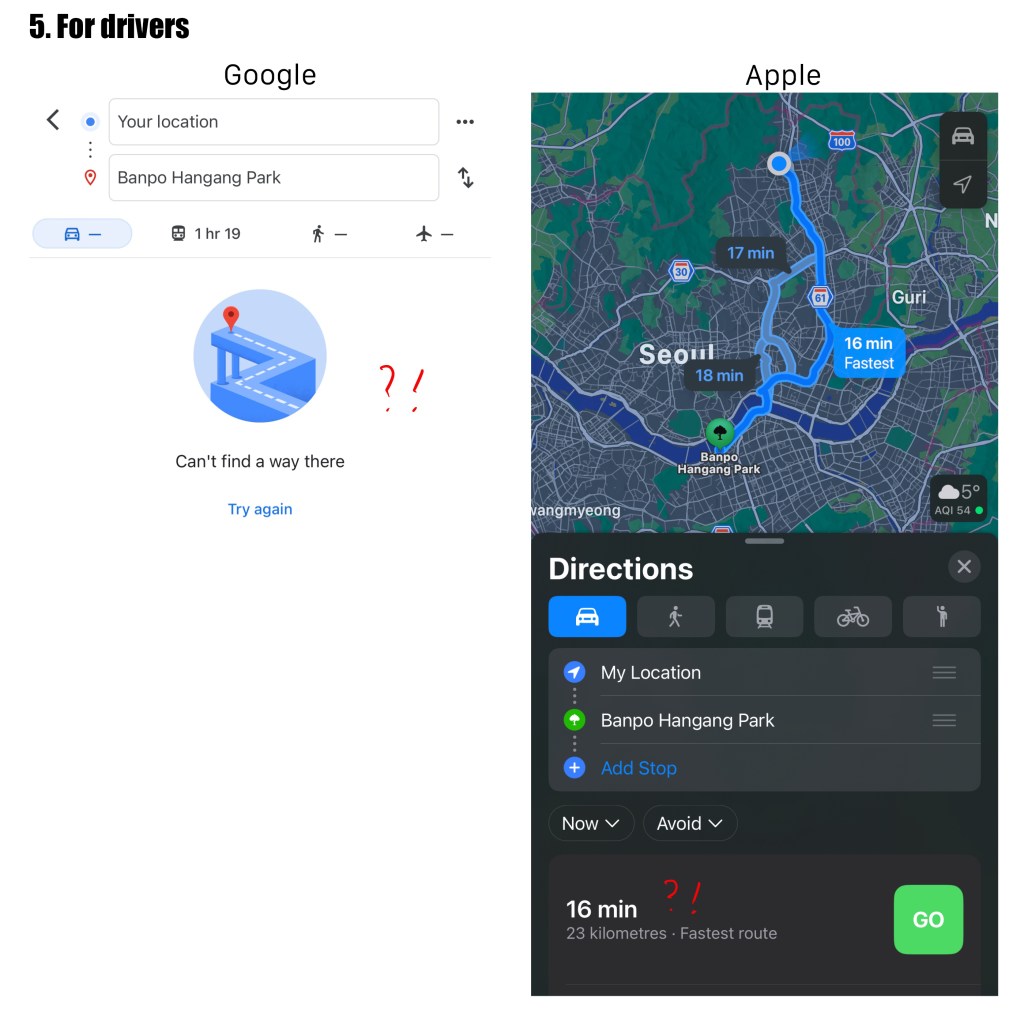
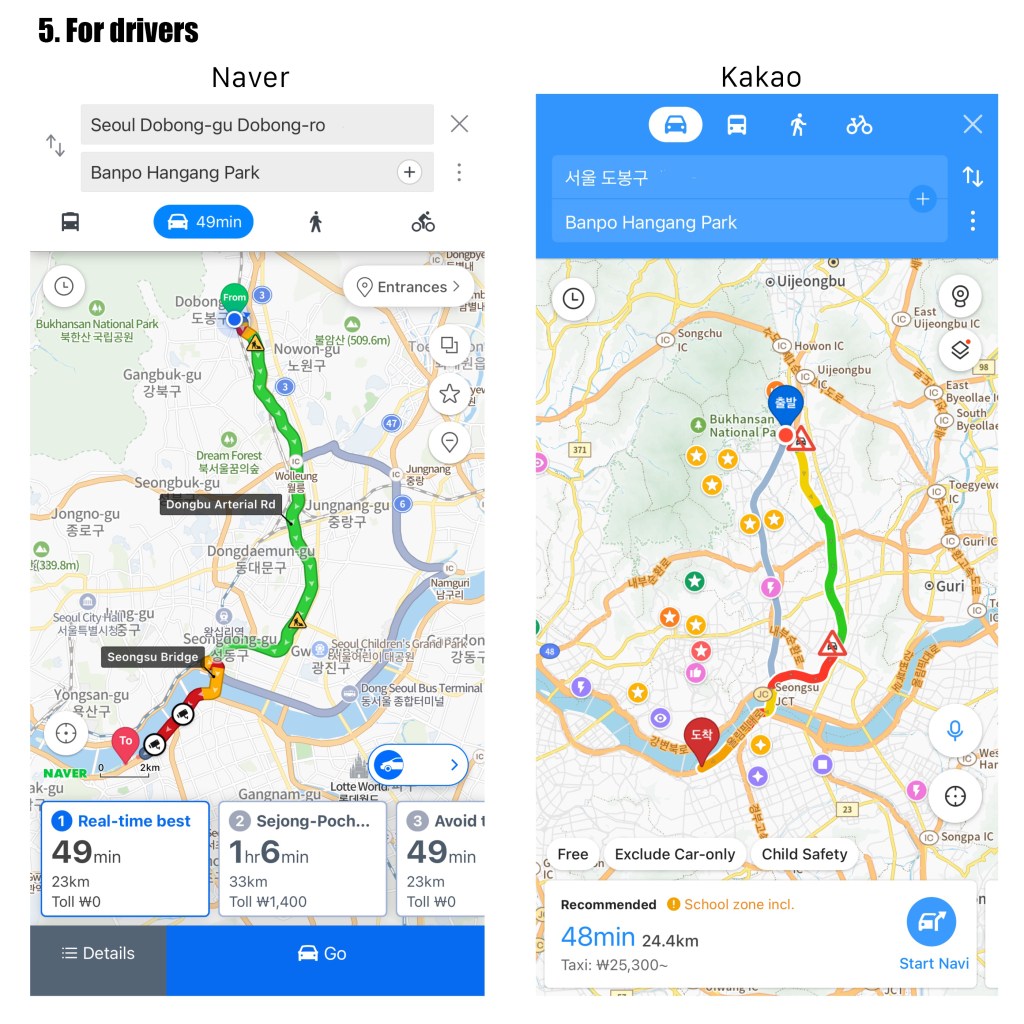
5. For drivers.
Google seems to work well for walking tourists. I’m writing this in a cafe located on the edge of Seoul, but it didn’t show any route from here to Banpo Hangang Park for driving a car. Apple shows the best route, but their estimated time is about 30 minutes different from the Korean app. They don’t seem to consider traffic on the road.
Both Naver and Kakao show the same route and similar estimated time of arrival. Both of them update in real-time, so if there are any changes on the road, they will change the route while driving.
Most Korean drivers, especially taxi or bus drivers, prefer Naver. But I recommend Kakao if you’re considering riding in a taxi because they show estimated taxi fares. Additionally, Kakao has its own taxi-calling app.
As a tour guide, I use both Korean maps together. Each of them has its own strongest characteristics. Especially when traveling outside of Seoul, it’s necessary to compare the two maps. But as a walking tourist, I prefer Kakao Map a little bit more. I feel like they are not as spoiled with ads.
My suggestion for non-Korean tourists is to use Google Maps and Kakao or Naver together, especially if you can speak Korean. Unfortunately, Google doesn’t adjust well in Korea but kindly shows up in English. Kakao and Naver have massive information but are not as user-friendly for international tourists.
Most importantly, I suggest learning Hangeul (Korean alphabet), which can make your travel much easier and fluent with only 28 letters.
So, please enjoy your travel with your preferred apps. Feel free to leave a comment about which navigation app you use in your country or while you travel. Safe travels! 🙂
Creative commons link
EZsPEDIA © 2024 by YUNMI LEE is licensed under CC BY-NC-ND 4.0
 EZ K-PEDIA
Leave a comment